Restaurant Menu: A Comprehensive Guide to Design, Format, and Usage
For anyone running a restaurant or looking to create a professional menu, understanding the right tools and formats is essential. A well-designed Restaurant Menu not only enhances the dining experience but also reflects the brand's identity. Whether you're a beginner or an experienced designer, knowing how to choose and use the right Restaurant Menu template can save time, reduce errors, and improve overall quality.
Understanding Restaurant Menu Templates
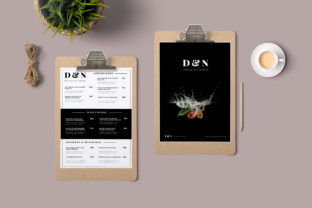
A Restaurant Menu template is a pre-designed layout that provides a structured foundation for creating your menu. These templates often come in various file formats such as AI, EPS, and JPG, each serving different purposes. For instance, AI (Adobe Illustrator) files are ideal for editing, while JPGs are better for quick previews or digital use.
When selecting a Restaurant Menu template, consider the size and specifications required. A common size is A4 (8.27×11.69 inches) with bleed areas to ensure clean printing. The file should be in CMYK color mode at 300 DPI for high-quality output. These details are crucial to avoid issues like misalignment, color distortion, or low-resolution prints.
Common Mistakes When Using Restaurant Menu Templates
One of the most frequent mistakes is overlooking the technical requirements of the file. Many users download a Restaurant Menu template without checking if it meets the necessary specifications, leading to poor print results. For example, using an RGB image instead of CMYK can result in unexpected colors when printed.
Another common error is not organizing layers properly. A well-structured Restaurant Menu template should have clearly labeled layers for text, images, and background elements. Without this, making changes or updating content becomes time-consuming and frustrating.
Additionally, some users neglect to check the fonts used in the template. Fonts are often included in a "Read Me" file, and failing to install or substitute them correctly can lead to formatting issues. This can affect readability and the overall appearance of the menu.
How to Avoid Common Pitfalls
To avoid these issues, start by verifying the file format and specifications before downloading. Ensure the template includes all necessary elements, such as bleed areas, proper color modes, and high-resolution images. If the template uses specific fonts, make sure they are available or have suitable alternatives.
Take the time to organize layers and structure the design logically. This makes future edits easier and ensures consistency across different menu versions. Always test the template with a sample print to catch any potential problems early.
Choosing the Right Restaurant Menu Template
When selecting a Restaurant Menu template, consider the purpose and audience. A casual café might benefit from a simple, clean design, while a fine-dining establishment may require a more sophisticated layout. The template should align with your brand’s visual identity and communicate the right tone to customers.
It's also important to think about scalability. A good Restaurant Menu template should allow for easy updates, whether you're adding new dishes, changing prices, or rebranding. Look for templates that offer flexibility in terms of text placement, image integration, and color customization.
Practical Tips for Working with Restaurant Menu Files
Before finalizing your Restaurant Menu, always review the following:
- File Format: Confirm that the template is in the correct format for your needs—AI for editing, JPG for digital use.
- Size and Bleed: Ensure the dimensions match your printing requirements and include bleed areas if necessary.
- Color Mode and Resolution: Use CMYK for print and 300 DPI for sharp, professional results.
- Layer Organization: Check that layers are named and grouped logically for easy editing.
- Fonts: Verify that all fonts are included or accessible, and test the template with different devices and software.
By paying attention to these details, you can significantly improve the quality and usability of your Restaurant Menu.
Realistic Examples and Better Approaches
Imagine you're designing a menu for a new bistro. You find a Restaurant Menu template online that looks great but doesn't include bleed areas. Without bleed, the edges of your menu might appear cut off during printing. To avoid this, look for templates that explicitly mention bleed settings or adjust the file accordingly.
Another scenario involves a user who downloads a template with custom fonts but doesn’t have access to them. Instead of struggling with the design, they could replace the fonts with similar ones that are widely available, ensuring the menu remains readable and visually appealing.
Final Thoughts on Restaurant Menu Design
A well-crafted Restaurant Menu is more than just a list of dishes—it's a critical tool for communication, branding, and customer engagement. By choosing the right template, understanding technical requirements, and avoiding common mistakes, you can create a menu that enhances your business and delights your guests.
Take the time to evaluate your options, test your designs, and make informed decisions. With the right approach, your Restaurant Menu will not only look great but also serve its purpose effectively.