Minimal Powerpoint: Simplify Your Presentations with Style
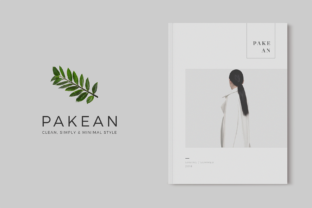
If you're someone who values clarity, efficiency, and visual appeal in your work, Minimal Powerpoint might be the perfect tool for you. Designed with simplicity in mind, this presentation template offers a clean, professional look that's easy to customize and use across different scenarios. Whether you're preparing a business pitch, teaching a class, or sharing ideas with colleagues, Minimal Powerpoint provides the structure you need without the clutter.
What Makes Minimal Powerpoint Unique?
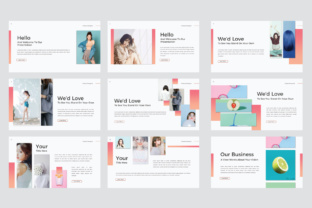
Minimal Powerpoint isn't just another slide deck—it's a thoughtfully crafted resource that emphasizes readability and focus. The design is based on a 16:9 widescreen ratio, ensuring compatibility with modern projectors and digital screens. Each of the 55 unique slides is built on master slides, making it easy to maintain consistency throughout your presentation. This means you can make global changes with just a few clicks, saving you time and effort.
The use of Calibri Light font adds a subtle, professional touch while keeping the text easy to read. Vector graphics, shapes, and icons are fully editable, so you can tailor the visuals to match your brand or personal style. Drag-and-drop functionality for images and data charts makes it simple to update content without needing advanced design skills.
When and Why People Use Minimal Powerpoint
Minimal Powerpoint is ideal for anyone who needs to communicate ideas clearly and efficiently. For example, a small business owner might use it to present a new product launch to investors. The clean layout helps keep the focus on the message rather than distracting visuals. A teacher could use it to create engaging lesson plans, using the editable tables and charts to illustrate complex concepts in a straightforward way.
Entrepreneurs and marketers often find value in the template’s flexibility. Whether they're creating a sales pitch, a client proposal, or a marketing strategy, Minimal Powerpoint allows them to present information in a way that's both professional and easy to digest. The ability to edit vector graphics means they can add custom icons or maps that align with their brand identity.
Freelancers and bloggers might use it to showcase their work or share insights with an audience. The wide range of slides ensures there's something suitable for almost any topic, from travel guides to tech reviews. Since the images are not included, users have the freedom to choose visuals that best represent their content, giving them more control over the final outcome.
Real-World Applications of Minimal Powerpoint
Let’s imagine a scenario where a local nonprofit organization is planning a community event. They need to present their vision to potential sponsors and volunteers. Using Minimal Powerpoint, they can create a compelling slideshow that highlights their mission, past successes, and future goals. The drag-and-drop feature makes it easy to add photos of previous events, while the editable charts can show how donations have been used in the past.
Another example is a student preparing a research presentation for a university class. With Minimal Powerpoint, they can organize their findings into clear sections, using the pre-designed slides to structure their talk. The ability to edit tables and charts helps them present data in a visually appealing way, making their argument more persuasive.
For a digital marketer, Minimal Powerpoint could be used to outline a campaign strategy. They can include timelines, budget breakdowns, and performance metrics using the built-in data chart tools. The clean design ensures that the audience remains focused on the key points rather than getting lost in complex visuals.
Who Benefits Most from Minimal Powerpoint?
Minimal Powerpoint is particularly useful for people who want to save time without sacrificing quality. It’s great for those who aren’t graphic designers but still want their presentations to look polished. Educators, for instance, can focus more on delivering content and less on formatting slides. Similarly, entrepreneurs can spend more time refining their pitch and less time trying to make their slides look professional.
Users who work remotely or collaborate with others will appreciate the ease of editing and sharing. Since the template is compatible with both PPT and PPTX formats, it’s accessible across different platforms and software versions. This makes it a practical choice for teams that need to work together on a presentation.
Those who are new to PowerPoint might find the intuitive interface and structured layout helpful. Instead of starting from scratch, they can build on a solid foundation, which reduces the learning curve and helps them produce better results faster.
Things to Consider Before Using Minimal Powerpoint
Before diving into Minimal Powerpoint, it’s important to think about your specific needs. Are you looking for a template that’s easy to customize? Does your audience prefer a more traditional or modern design? Understanding these factors can help you decide if this template is the right fit for your project.
Since images are not included, you’ll need to source your own or use placeholders. This gives you creative freedom but also requires some planning. If you’re not comfortable selecting or editing images, you may want to invest time in finding high-quality visuals that match your theme.
Additionally, while the template is designed for simplicity, it’s still important to understand the basics of PowerPoint. Knowing how to navigate the software, adjust layouts, and format text will help you get the most out of Minimal Powerpoint.
Final Thoughts on Minimal Powerpoint
Minimal Powerpoint is more than just a set of slides—it’s a tool that empowers users to communicate effectively without unnecessary complexity. Its clean design, flexible features, and user-friendly interface make it a valuable asset for a wide range of professionals and creatives. Whether you're presenting at work, teaching a class, or sharing ideas online, this template can help you deliver your message with confidence and clarity.